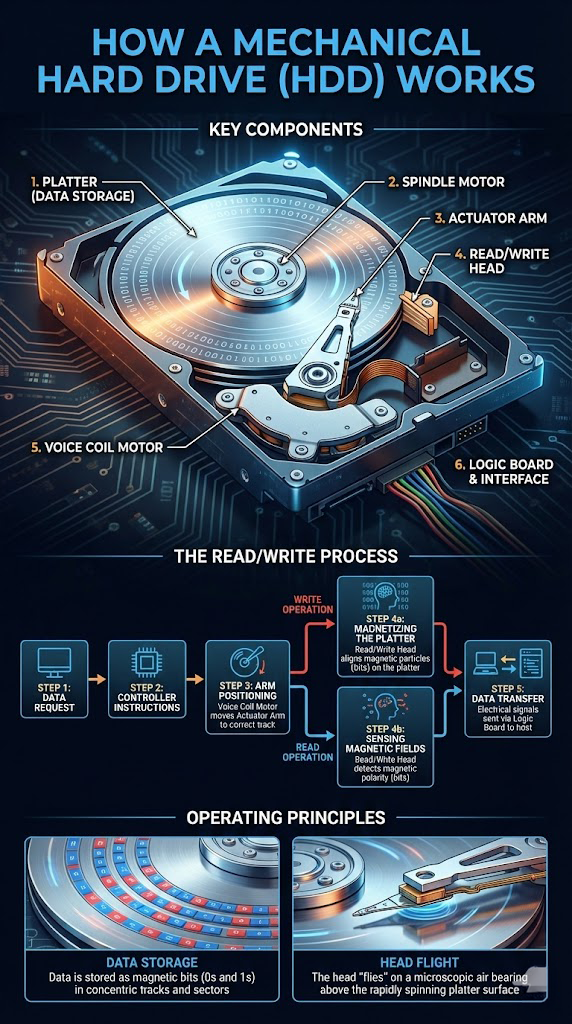
Mechanical hard drives (HDDs) have been the primary storage device in desktops, laptops, and servers for decades. Understanding how they work makes it easier to understand why they fail—and how data can be recovered.
Key Components
Platter (data storage)
A round disk coated with magnetic material. Data is stored as tiny magnetized areas representing 0s and 1s. Most HDDs have multiple platters stacked vertically.
Spindle motor
Spins the platters at high speed (commonly 5,400–7,200 RPM in consumer drives, much higher in enterprise models).
Actuator arm
Moves across the surface of the platter, positioning the read/write heads over the correct track.
Read/write heads
Tiny electromagnetic heads that hover nanometers above the platter surface.
- Writing: they change the magnetic orientation of the platter's surface.
- Reading: they sense those magnetic changes.
Voice coil motor
Precisely controls the actuator arm's movement using magnetic force, similar to a speaker coil.
Logic board + interface
The circuit board at the bottom of the drive. It contains the controller, cache memory, and interface (SATA, SAS, USB, etc.) that communicates with the computer.
The Read/Write Process
- Data request: Your operating system requests data from the drive (for example, opening a file).
- Controller instructions: The drive's controller consults its internal tables to find where that data lives on the platters—tracks, sectors, and heads.
- Arm positioning: The voice coil motor moves the actuator arm so the correct head is over the correct track.
- Write operation: The head alters the magnetic orientation of tiny regions on the platter, encoding bits.
- Read operation: The head detects the magnetic orientation of those regions, converting them back into bits the controller understands.
- Data transfer: The controller buffers the data and sends it to the host computer via the interface.
Operating Principles
Data storage
Data is arranged in concentric circles (tracks), sliced into sectors. Efficient layout and caching help performance.
Head flight
The heads do not touch the platter under normal operation. They "fly" on a microscopic cushion of air created by the rotating platters. Any contact ("head crash") can physically damage the magnetic layer and destroy data.
Why HDDs Fail
Common issues include:
- Head crashes or contamination inside the sealed chamber
- Motor or spindle failures
- Firmware corruption
- Electronic damage (power surge, liquid, or impact)
- Logical damage (deleted files, corrupted partitions, reformatted drives)
When You Need Help
If your hard drive clicks, grinds, or is no longer recognized, powering it on repeatedly can worsen the damage. Professional labs can often recover data even from severely damaged HDDs using cleanroom techniques and specialized tools.
For professional HDD data recovery, Denver Data Recovery offers a free quote online at denverdatarecovery.net or by phone at 720-222-0110.