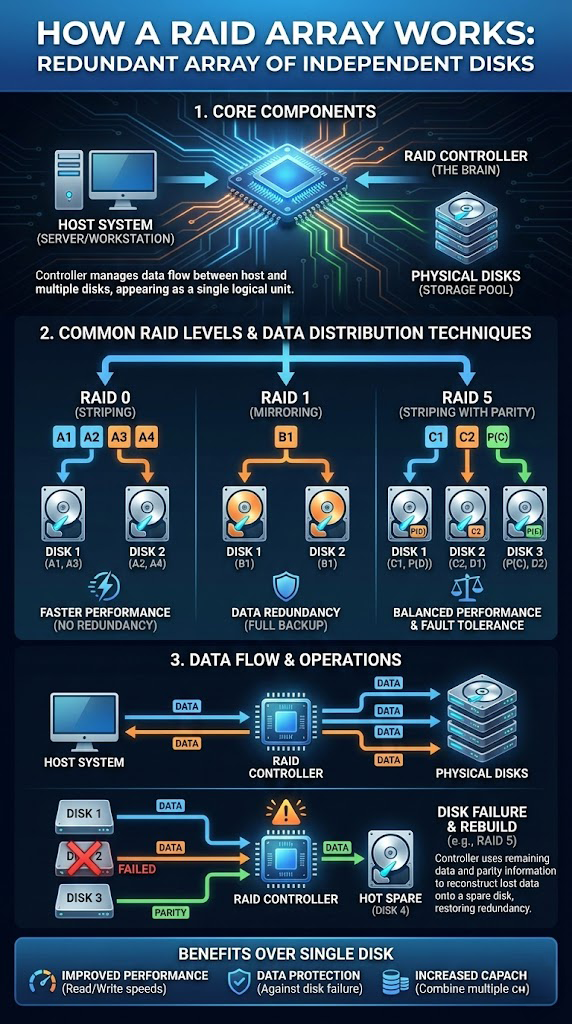
RAID (Redundant Array of Independent Disks) is a technology that combines multiple physical disks into a single logical unit for better performance, redundancy, or both. It's heavily used in servers, NAS devices, and workstations.
Core Components
Host system (server/workstation)
The computer or server using the RAID array for storage.
RAID controller ("the brain")
A dedicated card, built-in chipset, or software layer that manages how data is written to and read from all disks.
Physical disks (storage pool)
Two or more hard drives or SSDs that the RAID controller manages as one volume.
Common RAID Levels
There are many RAID levels; these are the most common in small businesses and home labs:
RAID 0 – Striping
Data is split across multiple disks (A1, A2, A3, A4…).
Pros: Very fast read/write performance, full capacity.
Cons: No redundancy. If one disk fails, the entire array fails.
RAID 1 – Mirroring
Data is duplicated on two or more disks (B1 on both disks).
Pros: Strong redundancy. If one disk fails, the other has a full copy.
Cons: Only half (or less) of total capacity is usable.
RAID 5 – Striping with parity
Requires at least three disks. Data and parity information (C1, C2, P…) are distributed across all disks.
Pros: Good balance of redundancy, performance, and capacity.
Cons: Rebuilds after a failure can be slow and risky, especially on large drives.
(Other levels like RAID 6, 10, etc. expand on these concepts.)
Data Flow & Operations
Normal operation
- The host sends read/write requests to the RAID controller.
- The controller splits data into blocks and distributes them across the disks according to the RAID level.
- During reads, it reassembles the blocks into the original data.
Disk failure (e.g., RAID 5)
- If one disk fails, the array can often keep running in a degraded state.
- The controller uses parity and remaining disks to reconstruct missing data on the fly.
Rebuild with a hot spare
- A designated hot spare disk can automatically take the place of a failed drive.
- The controller rebuilds the lost data onto the spare using parity and remaining disks.
Benefits Over a Single Disk
- Higher read/write performance
- Protection against certain disk failures
- Increased capacity by combining multiple drives
Why RAID Is Not a Backup
RAID protects against some hardware failures, but it does not protect against:
- Ransomware or malware
- Accidental deletion or overwriting
- File system corruption
- Multiple simultaneous disk failures
- Fire, flood, theft, or controller failures
When RAID goes wrong—especially with multiple failed drives or a damaged controller—recovery becomes complex and should be handled by specialists with RAID-specific tools and experience.
RAID or NAS Failed?
If your RAID or NAS has failed, power it down and contact a professional. Denver Data Recovery can assess your RAID case with a free quote.
Get help online at denverdatarecovery.net or by phone at 720-222-0110.