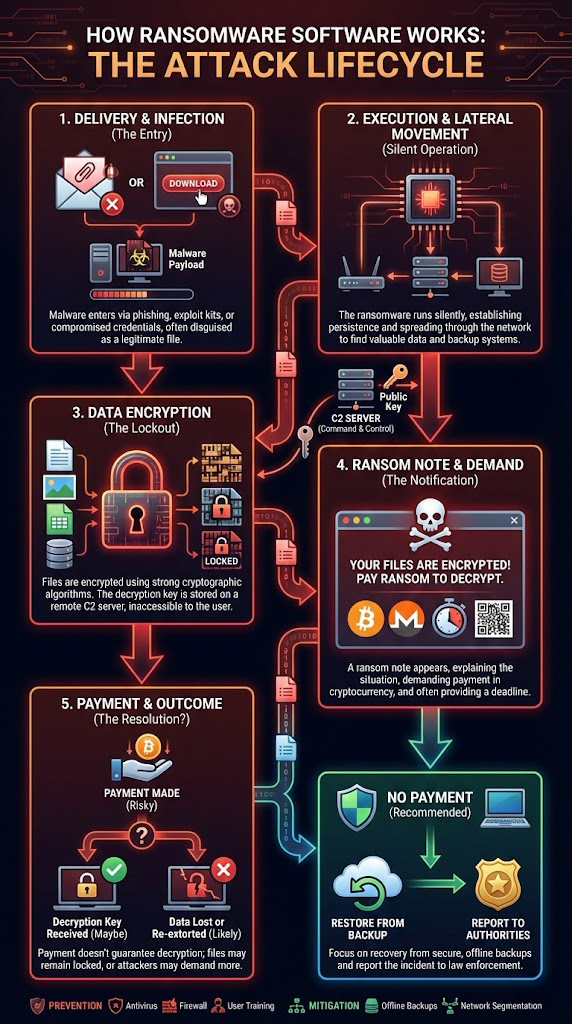
Ransomware is malicious software that encrypts your files and demands payment (often in cryptocurrency) for a decryption key. Understanding its lifecycle helps with both prevention and response.
1. Delivery & Infection (The Entry)
Ransomware typically arrives via:
- Phishing emails with malicious attachments or links
- Exploit kits targeting unpatched software
- Compromised credentials (remote desktop, VPN, etc.)
- Malicious downloads masquerading as legitimate tools
Once executed, the malware installs itself and contacts a command-and-control (C2) server if needed.
2. Execution & Lateral Movement (Silent Operation)
After infection, ransomware often:
- Runs quietly in the background
- Elevates privileges to gain more access
- Scans the network for file shares, backup targets, and high-value systems
- Disables security tools and shadow copies if possible
The goal is to reach and encrypt as much data as possible, including backups.
3. Data Encryption (The Lockout)
When ready, the ransomware:
- Generates or retrieves encryption keys
- Encrypts documents, databases, images, and other files using strong cryptography
- Renames or appends extensions to encrypted files
- Leaves ransom notes in each affected directory
In many modern variants, encryption is effectively unbreakable without the attacker's key.
4. Ransom Note & Demand (The Notification)
Victims see messages such as:
- "Your files are encrypted! Pay ransom to decrypt."
- Instructions for purchasing cryptocurrency
- Deadlines or threats of data leak ("double extortion")
- Attackers may offer to decrypt a few files as proof they can
5. Payment & Outcome (The Resolution)
Victims face two main paths:
Payment made (risky):
- Sometimes a decryption key is provided, sometimes not
- Decryption may be slow, incomplete, or fail altogether
- Attackers may demand further payments
No payment (recommended):
- Focus shifts to containment, eradication, and restore from backups
- Organizations are encouraged to report the incident to authorities
Prevention & Mitigation
Key protective measures include:
✓ Regular offline or immutable backups
Store backups offline or in immutable storage
✓ Up-to-date security patches
Keep all software and systems updated
✓ Endpoint protection and email filtering
Use antivirus and email security tools
✓ Multi-factor authentication
Require MFA for all remote access
✓ User awareness training
Educate staff about phishing attempts
✓ Network segmentation
Limit lateral movement capabilities
If You've Been Hit by Ransomware
- Shut down affected systems immediately
- Disconnect from network to prevent spread
- Preserve evidence for investigation
- Contact IT security professionals
- Report to law enforcement authorities
In many cases, even when files are encrypted or partially overwritten, some data may still be recoverable from unaffected devices or backups.
Need Professional Help?
Denver Data Recovery can work with you and your IT or legal team to assess recovery options, including forensic imaging and data restoration.
Request a free quote online at denverdatarecovery.net or call 720-222-0110.