Solid-state drives (SSDs) are now common in laptops, desktops, and servers. They have no moving parts and are much faster than traditional hard drives, but they rely on complex flash memory technology.
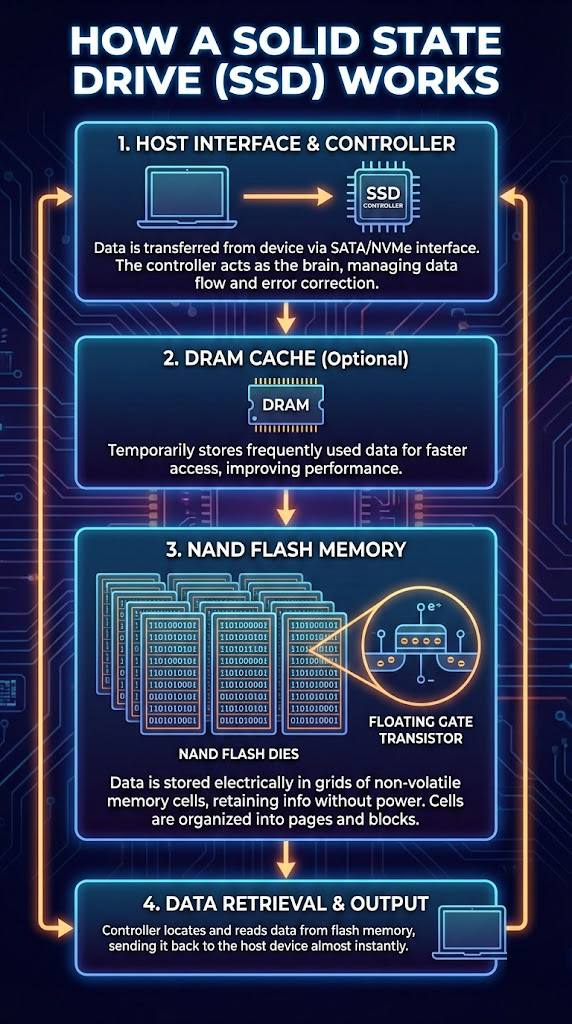
1. Host Interface & Controller
SSDs connect to systems through:
- SATA – common in older or budget systems
- NVMe over PCIe – much faster, used in modern laptops and high-performance desktops/servers
The SSD controller is effectively a mini-computer that:
- Manages data flow between the host and flash memory
- Handles wear-leveling, garbage collection, and bad block management
- Performs error correction and maintains a mapping table between logical and physical locations
2. DRAM Cache (Optional)
Many SSDs include a small amount of DRAM:
- Stores the controller's mapping tables (logical-to-physical address map)
- Caches frequently accessed data for faster reads and writes
- Improves overall performance and responsiveness
Some lower-cost SSDs use a portion of the NAND as a pseudo-cache instead of dedicated DRAM.
3. NAND Flash Memory
NAND flash is where your data actually resides:
- Organized into cells, pages, and blocks
- Uses floating-gate or charge-trap transistors to store information as electrical charge
- Available in types like SLC, MLC, TLC, and QLC (storing 1, 2, 3, or 4 bits per cell respectively)
Key behaviors:
- Cells must be erased by block before being rewritten
- Repeated program/erase cycles wear out cells over time
- The controller spreads writes across the drive (wear-leveling) to extend life
4. Data Retrieval & Output
Write process:
- Host sends data to SSD
- Controller selects free pages, possibly erases blocks if necessary
- Data is written to NAND cells and verified with error-correction codes
Read process:
- Host requests data from logical addresses
- Controller consults its mapping table to find the physical location
- Data is read from NAND, corrected if needed, and sent back with very low latency
SSD Failure Modes
Despite having no moving parts, SSDs can and do fail:
Controller failure or firmware corruption
The "brain" of the SSD stops working
Worn-out NAND flash
Exceeded program/erase cycles
Sudden power loss
Causing corruption or data loss
Logical problems
Deleted files, reformats, TRIM activity
Some failures present as a drive that suddenly disappears from the BIOS or reports 0 GB capacity.
Data Recovery from SSDs
Recovering data from SSDs is more complex than from HDDs because of:
- Wear-leveling and garbage collection
- TRIM commands that proactively erase unused blocks
- Encrypted controllers
However, specialized tools and techniques can often recover data from failed or partially accessible SSDs, especially when action is taken quickly after data loss.
If Your SSD Has Failed
If your SSD has failed or important files have disappeared, avoid writing new data and power it down. Time is critical for SSD recovery due to TRIM and garbage collection operations.
SSD Data Recovery Experts
Our specialists have the tools and expertise to recover data from failed SSDs, including NVMe, M.2, and SATA drives.
Contact Denver Data Recovery for a free quote online at denverdatarecovery.net or by phone at 720-222-0110.