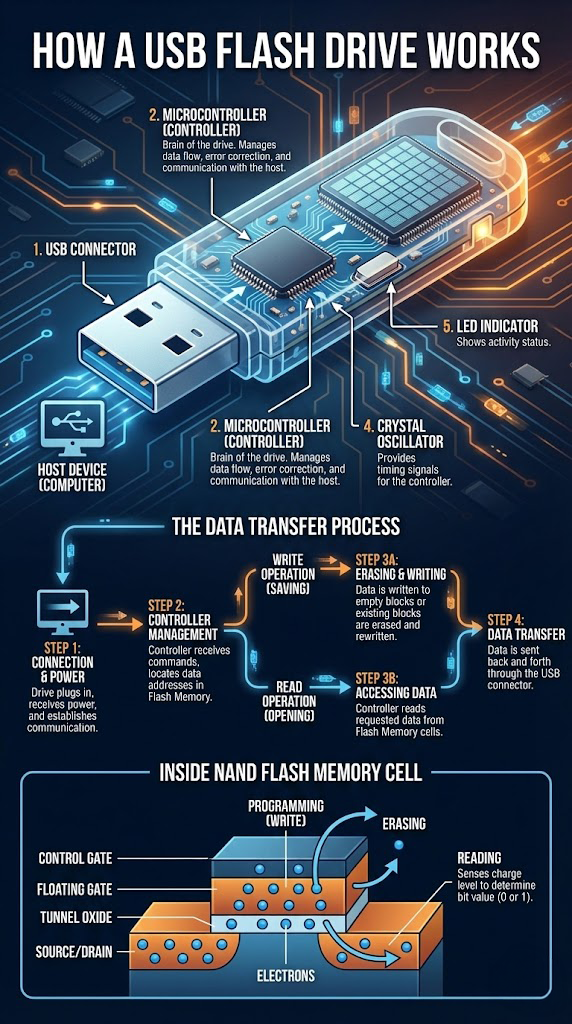
USB flash drives (thumb drives) are small, portable devices that store data using solid-state memory. Despite their size, they're complex electronic systems with several critical components.
Main Components
USB connector
The plug that connects to your computer, TV, car stereo, or other host device. It carries both power and data.
Microcontroller (controller)
The "brain" of the flash drive. It manages data flow, wear-leveling, logical addressing, and error correction. It translates between the host's file system and the flash memory's physical structure.
NAND flash memory
The actual storage area holding your files even when power is removed. Data lives in cells grouped into pages and blocks.
Crystal oscillator
Provides timing signals so the microcontroller can synchronize communication.
LED indicator (if present)
Shows power or activity, such as when data is being read or written.
The Data Transfer Process
Write operation (saving):
- Connection + power: You plug the drive in. The host detects the USB device, negotiates power, and loads a driver.
- Controller management: The host sends commands (read, write, erase) to the controller.
- Erasing + writing: NAND flash cannot overwrite data directly; it must erase blocks first, then program (write) new data into pages. The controller chooses blocks using wear-leveling so no area wears out too fast.
- Data transfer: Once written, data is confirmed and the host is notified that the write is complete.
Read operation (opening):
- The host requests data from specific logical addresses.
- The controller maps those addresses to physical locations in the NAND pages.
- The data is read, corrected using error-correction codes if needed, and sent back over USB.
Inside a NAND Flash Memory Cell
Each memory cell stores a bit (or more) by trapping electrons on a floating gate:
- Programming (write): electrons are added to the floating gate, changing its charge.
- Erasing: electrons are removed, resetting the cell.
- Reading: the controller measures the cell's charge level to determine whether it represents a 0 or 1.
Over time, repeated program/erase cycles wear out cells and increase the risk of data loss.
Common Failure Modes
- Physical damage (bent USB connector, broken solder joints)
- Controller failure or firmware corruption
- Worn-out NAND cells
- File system corruption or accidental deletion
Best Practices
- Always safely eject the drive before removal.
- Avoid leaving the drive in hot cars or damp environments.
- Don't use a flash drive as the only copy of critical data.
If your USB flash drive is no longer detected or shows as unformatted, professional tools can often access the raw NAND memory and rebuild the data.
Need Help with a Failed Flash Drive?
Get a free quote online at denverdatarecovery.net or call 720-222-0110.